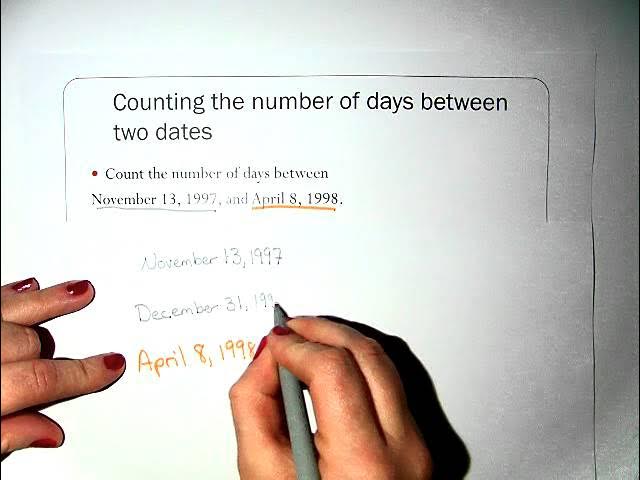
Earlier in the semester, we discussed a program (Ordinal Date Solution Code) that allows you to compute the ordinal date for any date; that is, how many days are there between the date and the first day of that year. Given that, it's also easy to figure out how many days are after that date in the year. You can use those two values to compute (much of) what we're after.
For example, suppose the dates we care about are July 4, 2024 and February 27, 2026. Using our computeOrdinalDate function we can discover that July 4, 2024 is day 186 of the year 2024 leaving 180 days remaining in the year, (366 - 186). Similarly, February 27, 2026 is day 58 of the year 2026 with 307 days remaining. We can easily see that between those two dates are the 180 days remaining in 2024 plus the 58 days at the start of 2026 plus the number of days in the intervening years. In this case, there's only one intervening year, 2025, which had 365 days. (In general, loop over the range of years summing the days.) So the number of days between those two dates is: 58 + 180 + 365 = 603. (Notice that we consider the days between to include date2; so there is one day, not zero days, between consecutive dates.)
Your task in this project is to implement this computation for two dates (with years after 1752). You can re-use the code from the solution to the compute ordinal date problem we discussed in class. However, you must re-factor that code into several functions; those are described below. Also, you'll write a function daysBetween to compute the number of days between two dates date1 and date2, assuming for that function that the dates are legal and that date2 is after date1. (Notice that it may be helpful to consider separately the case where the two dates are in the same year.)
Finally, you'll write a main function that will accept from the user two dates (provided as day, month, year), validate them, and compute and print the number of days between. Your program should accept an arbitrary number of such date pairs until the user enters as date1 0, 0, 0. If an invalid date is entered as either date1 or date2, or if date2 isn't after date1, print an error message and ask for the next pair. See the examples below.
Below is some sample behavior. Note the welcome message, the goodbye message, blank lines, and the lines of 50 hyphens between sections. The comments are added to make this clearer; you shouldn't implement those.
> python DatesDifference.py

This utility allows you to compute the number of days between
any two dates. To exit, enter 0, 0, 0 as the first date.

--------------------------------------------------

Enter day1 (1-31): 0                       # exit immediately
Enter month1 (1-12): 0
Enter year1 (after 1752): 0

Thanks for visiting!

> python DatesDifference.py

This utility allows you to compute the number of days between
any two dates. To exit, enter 0, 0, 0 as the first date.

--------------------------------------------------

Enter day1 (1-31): 29                      # invalid date1
Enter month1 (1-12): 2
Enter year1 (after 1752): 2026
Invalid date entered. Try again.

--------------------------------------------------

Enter day1 (1-31): 1
Enter month1 (1-12): 1
Enter year1 (after 1752): 1920

Enter day2 (1-31): 14                      # invalid date2
Enter month2 (1-12): 84
Enter year2 (after 1752): 2026
Invalid date entered. Try again.

--------------------------------------------------

Enter day1 (1-31): 1
Enter month1 (1-12): 1
Enter year1 (after 1752): 2026

Enter day2 (1-31): 0                       # invalid date2
Enter month2 (1-12): 0                     # here, not an
Enter year2 (after 1752): 0                # exit
Invalid date entered. Try again.

--------------------------------------------------

Enter day1 (1-31): 1                       # date2 must follow
Enter month1 (1-12): 1                     # date1 chronologically
Enter year1 (after 1752): 2026

Enter day2 (1-31): 31
Enter month2 (1-12): 12
Enter year2 (after 1752): 2025
Dates out of order: 1/1/2026 12/31/2025

--------------------------------------------------

Enter day1 (1-31): 7                       # start of WWII
Enter month1 (1-12): 12                    # for the U.S.
Enter year1 (after 1752): 1941

Enter day2 (1-31): 2                       # end of WWII
Enter month2 (1-12): 9
Enter year2 (after 1752): 1945
There are 1365 days between 12/7/1941 and 9/2/1945

--------------------------------------------------

Enter day1 (1-31): 17                      # Kendrick Lamar
Enter month1 (1-12): 6                     # birthday
Enter year1 (after 1752): 1987

Enter day2 (1-31): 27                      # project1 due
Enter month2 (1-12): 2
Enter year2 (after 1752): 2026
There are 14135 days between 6/17/1987 and 2/27/2026

--------------------------------------------------

Enter day1 (1-31): 0                       # exit program
Enter month1 (1-12): 0
Enter year1 (after 1752): 0

Thanks for visiting!

>
An important part of this project is practice writing functions. A template showing the functions you'll need is below. You must rewrite the code for computeOrdinalDate as a function. But don't use lists or other constructs we haven't covered in class. Your version should differ from the version discussed in class as follows:
Returning multiple values: The function computeOrdinalDate returns two values. Do that as follows:
return ordinalDate, remainingDays
In the calling environment, you can grab both values at once and
assign them to variables:
ordDate, remDays = computeOrdinalDate( day, month, year )
Code template:: The following is the partial template you should follow. The code is here: Template Code. Fill in code as indicated. It's perfectly OK to use code from the version of Compute Ordinal Date that I went over in class. You will need additional code not shown, e.g., your header, comments, global constants at the top, etc.
def isLeapYear( year ):
    """Assume year is an integer.  See if it's a leap year."""
    # I did this one for you.
    return (( year % 4 == 0 ) and ( not ( year % 100 == 0 ) or ( year % 400 == 0 )))

def daysInYear( year ):
    """Assume year is an integer. Return the number of days in year."""
    [your code goes here]

def validYear( year ):
    """Assume that the year is an integer.  Check if it's a year after 1752."""
    [your code goes here]

def validMonth( month ):
    """Assume that the month is an integer. Check if it's a legal month: 1..12."""
    [your code goes here]

def validDay( day, month, year ):
    """Assume the day is an integer and the month and year are legal. Check
    if day is legal for that month in that year."""
    [your code goes here]

def validDate( day, month, year ):
    """Return a boolean indicating whether the day, month, year designate a valid date."""
    [your code goes here]

def datesInOrder( day1, month1, year1, day2, month2, year2):
    """Return a boolean indicating whether date1 is no later than date2.
    Note: it's OK if the dates are the same. Assume the dates are legal."""
    [your code goes here]

def computeOrdinalDate( day, month, year ):
    """Assume that the date is legal. Compute the ordinal date for any
    date of any year in the Gregorian calendar (which began in 1753).
    Return the ordinal date and the number of days remaining in the year.

    """
    [your code goes here]

    # The ordinal date is in variable ordinalDate.  We also need how
    # many days are in the rest of the year.
    remainingDays = ( daysInYear( year ) - ordinalDate )
    return ordinalDate, remainingDays

def daysBetween( day1, month1, year1, day2, month2, year2 ):
    """Compute the number of days between the two dates given.  Assume
       that the two dates are valid and that date2 follows date1.

    """
    [your code goes here]

def main():
    """Loop to accept from the user two dates, validate them, and display
    the number of intervening days.  If either date is illegal, print
    an error and accept another pair.  Also check that date2 follows
    date1 chronologically.  Stop when the first date is (0,
    0, 0).  You can assume that all user inputs are non-negative
    integers.

    """
    [your code goes here]

main()
Your file must compile and run before submission. It must also contain a header with the following format:
# Assignment: Project1
# File: DatesDifference.py
# Student:
# UT EID:
# Course Name: CS303E
#
# Date Created:
# Description of Program:

>>> from DatesDifference import *
>>> isLeapYear( 2000 )
True
>>> isLeapYear( 2001 )
False
>>> daysInYear( 2000 )
366
>>> daysInYear( 2001 )
365
>>> validYear( 2000 )
True
>>> validYear( 200 )
False                                     # year must be > 1752
>>> validMonth( 1 )
True
>>> validMonth( -1 )
False
>>> validDay( 29, 2, 2001 )
False
>>> validDay( 29, 2, 2000 )
True
>>> validDate( 27, 2, 2026 )
True
>>> computeOrdinalDate( 27, 2, 2026 )
(58, 307)
>>> daysBetween( 1, 1, 1900, 1, 1, 2000 )
36524
>>> main()

This utility allows you to compute the number of days between
any two dates. To exit, enter 0, 0, 0 as the first date.

--------------------------------------------------

Enter day1 (1-31): 1
Enter month1 (1-12): 1
Enter year1 (after 1752): 2000

Enter day2 (1-31): 1
Enter month2 (1-12): 1
Enter year2 (after 1752): 2026
There are 9497 days between 1/1/2000 and 1/1/2026

--------------------------------------------------

Enter day1 (1-31): 0
Enter month1 (1-12): 09
Enter year1 (after 1752): 0
Invalid date entered. Try again.

--------------------------------------------------

Enter day1 (1-31): 0
Enter month1 (1-12): 0
Enter year1 (after 1752): 0

Thanks for visiting!

>>>
Using Symbolic Constants: In this program, we're "encoding" months as numbers [1..12] and using the number of days in various months, e.g., 28, 29, 30, 31. That might not immediately be obvious to someone reading your code. This is a great example when symbolic constants are useful. By convention, the names of symbolic constants should be in all capital letters.
For example, instead of using the numbers [1..12] to refer to the months of the year, we might define the number associated with each month as a symbolic constant. If possible, these should be defined outside of any function, preferably near the top of your file.
JAN = 1
FEB = 2
...
DEC = 12
Then, any reference to 2, say, that refers to February will instead be FEB in your code. This makes your program much more readible and maintainable. For example, to see whether the month entered is legal, you might have code containing the condition:
   if JAN <= month <= DEC:
      ...
And when computing, say, the first day of a month you might have
have a clause such as:
   elif month == OCT:
      return WED
Now, isn't that more readible than:
   elif month == 10:
      return 3
But notice that the Python assignment
JAN = 1is really just defining a variable, not a constant. There's nothing to prevent you from assigning JAN a different value within your program. (But you'd be nuts to do that.) Treat it as a symbolic constant even though there's nothing in Python (unlike some other programming languages) that really guarantees that it remains constant.
Another great use is to give a symbolic name to a string or numeric value that appears frequently in your code, but which never changes within your program:
INTEREST_RATE = 8.5In addition to making your code easier to read, it makes it simple to update your program if the value of this constant changes. Otherwise, you'd have to comb through your entire program to find every occurrence of 8.5 (and make sure that that is actually referencing the interest rate).
Similarly, if you use a constant string in your code, consider defining it as a symbolic constant:
OUT_OF_RANGE_MESSAGE = "Value is out of range. Try again."Group these at the top of you file to make them easy to modify and to prevent mis-typing them:
    if not ( LOWER <= val <= UPPER ):
       print( OUT_OF_RANGE_MESSAGE )
BTW: Many students get confused when defining symbolic constant names. Remember JAN and WED are just the names of variables; they're not strings. So, you wouldn't say:
if "JAN" <= month <= "DEC":
That would give you a type error; you'd be comparing numbers and
strings.