
CS 312 Assignment 11, Critters, Implementing classes
Programming Assignment 11: Individual Assignment. You must complete this assignment by yourself. You cannot work with anyone else in the class or with someone outside of the class. You are encouraged to get help from the instructional staff. Recall we will check submissions with plagiarism detection software. If you copy code from someone else you will be subject to the penalties for academic dishonesty.
Placed online: Tuesday, April 19
20 points, ~2% of total grade
Due: no later than 11 pm, Thursday, April 28
Provided Files: There are multiple support files you will have to download from the assignment web page.
CritterMain.java. The class with the main method for the GUI and simulation.
MiniMain.java. A class with some simple Critter tests. Output is to System.out. Use this to check if your classes are correct.
Critter.java. The base class for the animals in the simulator
Stone.java. A simple Critter.
Ant.java, Bird.java, Hippo.java, Vulture.java, and Longhorn.java. The Critter classes you will implement
A11.zip. All the given files in one zip file for easier downloading if you are familiar with the zip archive format.
NOTE, when you compile the code you may get a compiler warning. For this assignment, these compiler warnings can be ignored.
However, be sure you have no unnecessary imports. For example do NOT import Critter, Critter.Attack, or Critter.Direction.
Purpose: The purposes of this assignment are:
Description:
Many, many thanks to Marty Stepp, Stuart Reges, and Steve Gribble for sharing this assignment with me.
Complete a set of classes that define the behavior of various animals (Critters). The program is a graphical simulation of a two dimensional world with different types of Critters moving around on it. The Critters move, eat, and fight in various ways. As you implement the required classes, you are defining those differences.
Each species of Critter (class) has a score during the game. A class's score is based on how many Critters of that type are alive, how much food they have eaten, and how many other Critters they have defeated.
Moving: During each round of the simulation each Critters is asked which direction it wants to move. A Critter can move one square to the north, east, south, or west or the Critter may choose to remain in its current location.
The directions a Critter may move represented as a Java Enum (enumerated type) named Direction. The Direction Enum is nested inside the Critter class. Classes that are descendants of Critter (they extend Critter directly or indirectly) can access the Enum values with the code Direction.NORTH or Direction.CENTER for example.
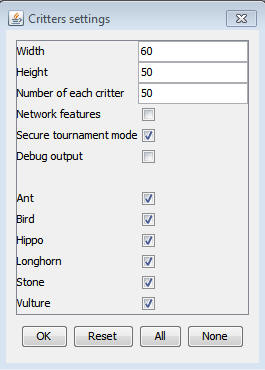
The world the Critters move around in is of finite size, but it is a torus, like a doughnut; if a Critter goes off the right edge of the 2d grid they pop up on the left edge and vice versa. Likewise if a Critter goes off the south edge of the 2d grid they pop up on the north edge and vice versa. The Critter world is divided into cells that have integer coordinates like the 2d arrays we studied in class. The upper left cell has coordinates (0,0). x coordinates increase to the right and y coordinates increase as you go down. The default size of the world is 60 cells across and 50 cells high, although this can be altered when the program is started.
Your code is NOT in control of the overall program execution. You won't write the code that actually creates the various Critter objects. Instead you are implementing a series of classes to specification ("to 'spec' ") and the given code uses the classes you implement. The existing classes are clients of your classes. As we talked about in lecture this is how most programs are written. They are not written by a single person, rather by a team of people.
You may find yourself wanting to move your Critter several spaces at once, but this is not possible. The only way a Critter can move is if the simulator asks the Critter to move and the Critter simply responds with the direction it wants to move. The simulator will then move the Critter one space in the appropriate direction. This is a good introduction to the kind of programming that is done with objects and if you move on to the follow class, CS314, you will be doing a lot of programming in this style. (If you want to move several spaces you must have your class remember what its next move should be using an instance variable so it can give the right move to the simulator the next time the simulator asks.)
Fighting: As the simulation runs Critters can collide with each other by moving into the same location. Again, the simulator takes care of all of this, not the Critters. When two Critters enter the same cell they fight to the death. The winning Critter survives and the losing Critter is removed from the simulation. (Again, most of this is handled by the simulation, not by the Critters.)
The values for fighting are a Java Enum (like our Suits) stored inside the Critter class. The name of the Enum is Attack. Critters simply pick a value for ROAR, POUNCE, or SCRATCH when the simulator asks them. A Critter can also FORFEIT meaning it gives up and the other Critter wins as long as it ROARs, POUNCEs, or SCRATCHes. If both Critters FORFEIT, one of them wins at random. The outcome of the duels are:
| Critter #2 | ||||
| Critter #1 | ROAR | POUNCE | SCRATCH | |
| ROAR | random winner | #2 wins | #1wins | |
| POUNCE | #1 wins | random winner | #2 wins | |
| SCRATCH | #2 wins | #1 wins | random winner | |
Mating: Note, the simulator takes care of this. You do not have to write any code to deal with mating. When two Critters of the same species collide they do not fight. If neither of the Critters have mated before during the simulation, they mate to produce a new Critter of their type. This takes place automatically and Critters have no choice in whether to mate or not. Critters are vulnerable to attack when mating. any other Critter that collides with them will defeat them. Each Critter can mate only once during its lifetime.
Eating: The simulation world also contains food (represented by the period character, ".") for the animals to eat. There are pieces of food on the world initially, and new food slowly grows into the world over time. As an animal moves, it may encounter food, in which case the simulator will ask your animal whether it wants to eat it. Different kinds of animals have different eating behavior; some always eat, and others only eat under certain conditions.
Every time one class of animals eats a few pieces of food, that animal will be put to "sleep" by the simulator for a small amount of time. While asleep, Critters cannot move, and if they enter a fight with another animal, they will always lose.
Inheritance: Each class you write will be a descendant of the super class, Critter. You will use inheritance as discussed in Chapter 9 of the textbook. Inheritance makes it easier for the simulation in CritterMain to "talk" (call methods) on the Critters. Inheritance helps ensure we know what methods your have implemented. Most of your class headers will start like this:
public class Ant extends Critter { ...
The Critter class contains the following methods. You will override (replace with a new version in your classes) some or all of these methods depending on the specification of the Critter.
|
Note: You are not necessarily
required to write extends Critter on every single animal class you write. If
you find that two animals are very similar to each other, you should have
one extend the other to reduce redundancy and take advantage of inheritance.
Running the Simulator:
When you press the Go button, it begins a series of turns. On each turn, the simulator does the following for each animal:
After moving all Critters, the simulator redraws the screen, asking each Critter for its
toString and getColor values. It can be difficult to test and debug with many Critters. I suggest adjusting the initial settings to use a smaller world and fewer Critters. There is also a Debug checkbox that, when checked, prints console output about the simulation behavior.You should also use the MiniMain program to print out some simple tests.
When your start the program you will see a menu GUI like the following:
You can ignore the Secure tournament mode and Network features check boxes. They are not used in our version of the program.
Critters to implement:
Here is where you actually get to write code! Complete four
Critter classes. Each class must have only one constructor and that
constructor must accept exactly the parameter(s) described below. For
random moves each possible choice must be equally likely. You may either use
an object of type Random or the Math.random()
method to obtain pseudorandom numbers.
Ant:
| constructor | public Ant(boolean walkSouth) |
| fight behavior | always scratch |
| color | red |
| movement behavior | if the Ant was constructed with a walkSouth value of
true then it alternates between south and east in a zigzag (S, E, S, E,
S, ...)
if the Ant was constructed with a walkSouth value of false then it alternates between north and east in a zigzag (N, E, N, E, N, ...) |
| eating behavior | always returns true |
| toString | "%" - the percent sign |
Bird:
| constructor | public Bird() |
| fight behavior | roar if opponent looks like an Ant "%", otherwise pounces |
| color | blue |
| movement behavior | a clockwise square; first goes north 3 times, then east 3 times, then south 3 times, then west 3 times, then repeats |
| eating behavior | never eats (always returns false) |
| toString | "^" caret if the bird's last move was
north or it has not moved. ">" greater than if the bird's last move was east "V" capital v if the bird's last move was south "<" less than if the bird's last move was west |
Hippo:
| constructor | public Hippo(int hunger) |
| fight behavior | if this Hippo is hungry (if eat would return true) then scratches, else pounces |
| color | gray if the hippo is hungry (if eat would return true), otherwise white |
| movement behavior | moves 5 steps in a random direction (north, south, east, or west), then chooses a new random direction and repeats |
| eating behavior | returns true the first hunger (parameter to constructor) times it is called and false after that |
| toString | the number of pieces of food this hippo still wants to eat as a String |
The
Hippo constructor accepts a parameter for the maximum number of food that Hippo will eat in its lifetime (the number of times it will return true from a call to eat). For example, a Hippo constructed with a parameter value of 8 will return true the first 8 times eat is called and false after that. Assume that the value passed is non-negative.The
toString method for a Hippo returns the number of times that a call to eat would return true for that Hippo. For example, if a new Hippo(4) is constructed, initially its toString return "4". After eat has been called on it once, calls to toString return "3", and so on, until the Hippo is no longer hungry, after which all calls to toString return "0". You can convert a number to a string by concatenating it with an empty string. For example, "" + 7 makes "7".
Vulture:
| constructor | public Vulture() |
| fight behavior | roar if opponent looks like an Ant "%", otherwise pounces |
| color | black |
| movement behavior | a clockwise square; first goes north 3 times, then east 3 times, then south 3 times, then west 3 times, then repeats |
| eating behavior | returns true if this vulture is hungry. A vulture is initially hungry and remains hungry until they eat once. After eating once the vulture is not hungry until they get into a fight. After one or more fights the vulture is hungry again. |
| toString | "^" caret if the vulture's last move was
north or it has not moved. ">" greater than if the vulture's last move was east "V" capital v if the vulture'sl ast move was south "<" less than if the vulture's last move was west |
A
Vulture is a specific sub-category of bird with some changes. Think of the Vulture as having a "hunger" that is enabled when he is first born and also by fighting. Initially the Vulture is hungry (so eat would return true from a single call). Once the Vulture eats a single piece of food, he becomes non-hungry (so future calls to eat would return false). But if the Vulture gets into a fight or a series of fights (if fight is called on it one or more times), it becomes hungry again. When a Vulture is hungry, the next call to eat should return true. Eating once causes the Vulture to become "full" again so that future calls to eat will return false, until the Vulture's next fight or series of fights.
Longhorn
| constructor | public Longhorn() // may not accept any parameters |
| other methods | You decide. Recall the toString method must return a String of length 1 for this assignment. |
You decide
the behavior of your Longhorn class. Your Longhorn class should be competitive and interesting. The Longhorn species should win by having the highest score of all the species after several thousand steps of the simulator. Note, it is okay for individual Longhorn to lose some fights as long as in the end the Longhorn species has the highest overall score. Part of your grade will be based upon writing creative and non-trivial Longhorn behavior. The following are some guidelines and hints about how to write an interesting Longhorn.Your
Longhorn's fighting behavior may want to utilize the opponent parameter to the fight method, which tells you what kind of Critter you are fighting against (such as "%" if you are fighting against a Ant). Your Longhorn can return any text you like from toString (besides null) and any color from getColor. Each Critter's getColor and toString are called on each simulation round, so you can have a Longhorn that displays differently over time. The toString text is also passed to other animals when they fight you; you may want to try to fool other animals. Beware, we well test your Longhorn against some unknown species that might also be very tricky.Unlike most assignments, your
Longhorn can use any advanced material you happen to know and are part of Java 8. However, DO NOT assume the names of any unknown Critter class. Doing so will likely result in compile errors and you will lose all correctness points,Each Critter class has some
additional methods that it receives by inheritance from Critter. Your Longhorn may want to use these methods to guide its behavior. None of the methods below are needed for Ant, Bird, Hippo, or Vulture. Do not alter or override these methods.
|
The simulator calls these methods on your Critter to notify you when you have won/lost a fight, been put to sleep/ wake up, start/end mating, or when the game world has reset, respectively. public void win(), public void sleep(), public void mate(), public void reset(), public void lose(), public void wakeup(), public void mateEnd()
You can override these methods in the Longhorn class in order to implement behaviors or store information when those events (win, lose, sleep, wakeup, mate, mateEnd, and reset) occur and the simulator calls the methods.
Explain in the comments section at the top of your Longhorn class how your plan for the Longhorn class to triumph in the simulation and what interesting and creative approaches you took with the Longhorn class.
There are also various notification methods at the bottom of the
Critter class. These methods are provided to inform you about the result of
fights, sleeping, etc.
Currently the methods do nothing, but you can override these methods in your
Longhorn to be informed of these events. Why might this be useful? You may
want to develop a strategy for future events based on what has happened to
your Longhorns.
Implementation Guidelines:
Download all the required files and add them to your Eclipse or BlueJ project. The provided GUI and simulation can run even if you haven't completed all of the required Critter classes.
The simulator runs even if you haven't completed all the Critters. The classes increase in difficulty from
Ant to Bird to Vulture to Hippo to Longhorn. I suggest doing Ant first. Look at Stone.java and the lecture/section examples to see the general structure.It will be impossible to implement each behavior if you don't have the right state (instance variables) in your object. As you start writing each class, spend some time thinking about what instance variables
will be needed to achieve the desired behavior.One thing that students in the past have found particularly difficult to understand is the various
constructors for each type of animal. Some of the constructors accept parameters that guide the behavior of later methods of the animal. It is your job to store data from these parameters into fields of the animal as appropriate, so that it will "remember" the proper information and will be able to use it later when the animal's other methods are called by the simulator.Test your code
incrementally. A Critter class will compile even if you have not written all of the methods (the unwritten ones will use default behavior). So add one method, run the simulator to see that it works, then add another. Also you need to check you have correctly implemented the behaviors of each Critter. It is easy to convince yourself your code is correct because the Critter does SOMETHING in the simulator, but you should use the tests in MiniMain.java as well as your own tests to ensure your code is fully correct.Style Guidelines and grading:
Some of the points for this assignment will be awarded on the basis of how much energy and creativity you put into creating an interesting and effective Longhorn class. Style points will also depend on the basis to simply and clearly implement each Critter's required behavior. As always we expect you to use good style in your source code.
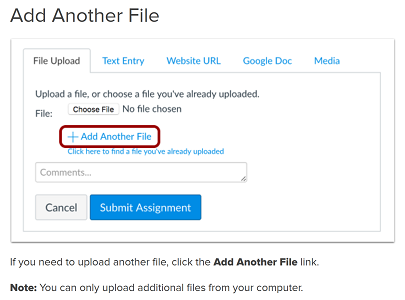
Turn in your files named Ant.java, Bird.java, Hippo.java, Vulture.java, and Longhorn.java via Canvas. Do not turn in any other classes. Note, you must submit multiple files. See this page for instructions on how to add multiple files. In particular look at the section on "Add Another File".
You must add and complete the standard header to each file you turn in. Replace <NAME> with your name.
Standard header:
/**

    * CS312 Assignment 11.

    *

    * On MY honor, <NAME>, this programming assignment is MY
    own work

    * and I have not provided this code to any other student.

    *

    * Student  name:

    * UTEID:

    * email address:

    * Grader name:

    * Number of slip days used on this assignment:

    *

    */
Checklist: Did you remember to: