Students will study Android APIs and learn to build significant Android
applications. The course will have a practical focus, with significant in-class
programming, programming assignments and a large project (optionally with a partner).
The course philosophy is that programming is learned by doing. While the course
focuses on Android, we will learn general principles of software engineering and
mobile app development.
The course assumes familiarity with programming and object oriented terminology. The
course is taught entirely in Kotlin, the
modern sibling of Java. We will spend a bit of time reviewing Kotlin, but you are
expected to be familiar enough with Java that the transition will be seamless. It is
expected that you will have to study Kotlin on your own as part of the class.
The course does not assume any previous experience with Android programming.
Course Staff
Teaching Assistants
Justin Medich
jmedich@utexas.edu
Office Hours: Desk 1 in GDC 1.302 on Mondays and Wednesdays from 1PM-2PM.
The required reading for this class is the demo code that I will push to the
class' shared github repository (see below for details about git). You are expected to read and understand all of the
code in this repository. We will spend significant time in class reviewing and
understanding this code.
To incentivize you to read the code and to give some shape to our in-class
interactions, I guarantee at least one error per non-trivial file of demo code. We
will find and fix these errors in class.
You can discuss them on the discussion site.
The online masters demos will not follow this pattern. They will be correct.
Online documentation
For this course the official
Android documentation is essential, and I will often include links to their documentation.
Android device optional
You do not need an Android device for this class. However, you might
enjoy using one for development. There are a variety of inexpensive
devices available, some subsidized by showing you ads on the lock screen.
Discussion site (Ed discussion)
We will answer questions in ed discussion which is linked
in canvas and also accessible here.
We will use that forum to communicate about the course, and you are expected (required) to keep up with announcements on that site.
The discussion site is great for general questions and clarification. It is not
appropriate for you to post specific code and ask your fellow
students to debug it. Please do not do that. You can post code
privately to course staff.
No official textbook
There is no textbook for this course, however, I
highly recommend you get an Android programming book. When it comes to
educating yourself, I believe in an "all of the above" approach. That
means attending lecture, discussing the material with your peers,
reading books, reading online sources, programming, experimenting,
reading official documentation, etc.
I've always found a book or two is a valuable part of learning.
There are many excellent Android programming books out there, and I
encourage you to visit your local bookstore and figure out which one
will work for you. They have different approaches, for example, some
emphasize principles and some emphasize recipes. You should judge
which approach works for your learning style. One trick that I use when
evaluating a book is to have some specific question, like how does
this book explain content providers? Then
see if the book has a reasonable answer to your question.
I've heard that Android Programming: The Big Nerd Ranch Guide (Big Nerd Ranch
Guides) is good. Google is your friend.
Development Environment Setup
Android Studio
If you have a laptop, please download and install Android Studio. It
can be a time consuming process (and it can consume significant
bandwidth). We will use Android Studio extensively for in-class programming. It
will behoove
you to have it updated before class because updating in class is time consuming and boring.
Bear in mind that Android Studio
updates frequently and the updates are worth tracking. Please
plan ahead. For example, if we have a flipped classroom activity, you should
update Android Studio the night before.
Android Studio now comes with an embedded Java runtime environment (Java JRE),
which would mean you don't need to download one.
If you do want to download a Java JRE (or java development kit (JDK) which contains
more software), google it and
choose the one for your platform.
Android studio should be able to find the one you install.
Download Android
Studio as a development environment. We will spend most of our time
in this class in Android Studio.
Within Android Studio be sure to download the hardware-assisted
emulator (which will be the HAXM installer for Intel x86 or for
Apple silicon, the ARM version).
Here
there is help on how to get started with downloading and installing
Android Studio.
You also need
to run the standalone SDK Manager from within the GUI and then update
it seperately.
Here is a link that explains how to update SDK tools. Use the stable channel.
Enable Google Play services (Tools > SDK Manager > Android SDK > SDK Tools > Check Google Play services > hit apply).
Use the builtin Java interpreter. I recommend Java 21. In fact, I require it in many of my
build files.
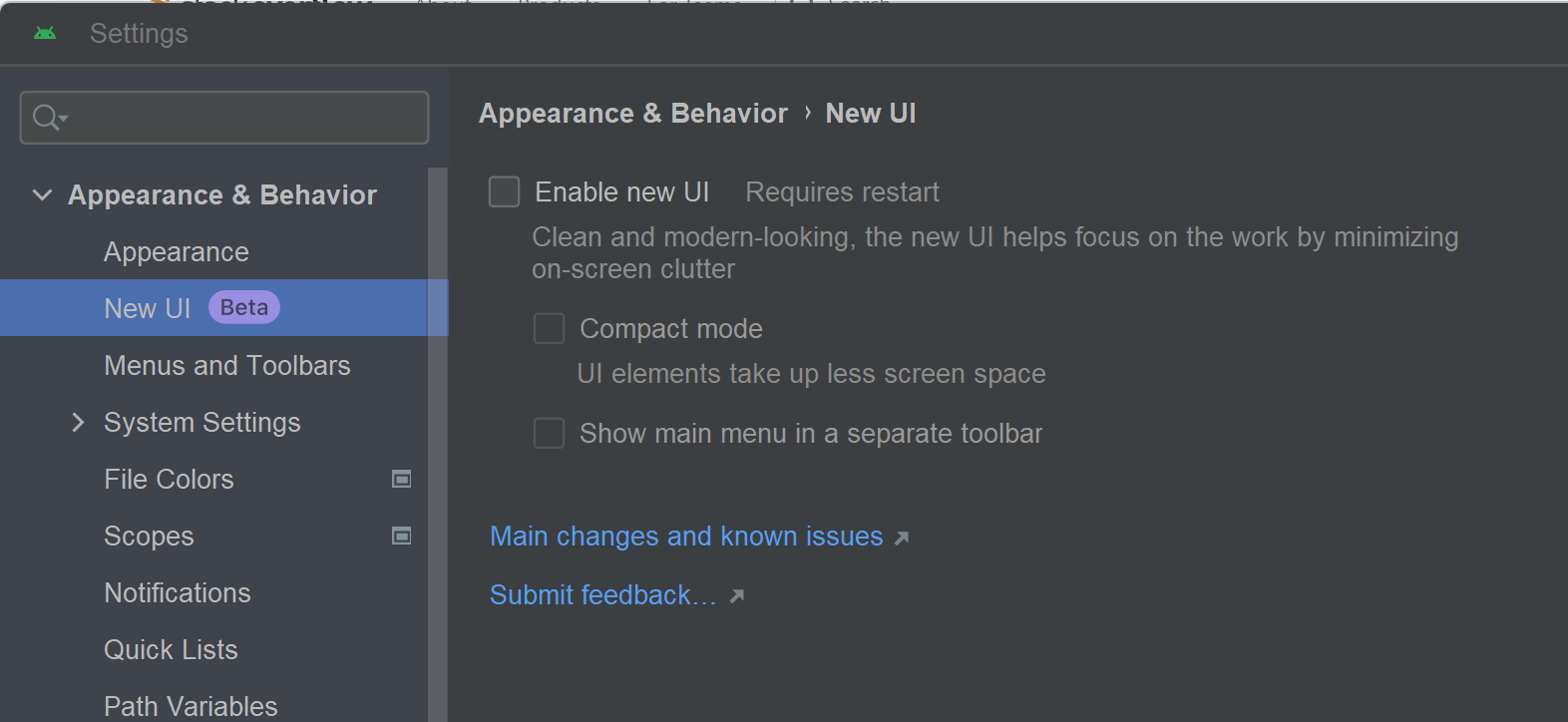
Android studio has a "distraction free" mode that is now the default. It hides most
of the useful menus behind an additional mouse click. I do not like this mode and I
do not recommend it. Click here to see how my
Android Studio is configured to disable it. Go to Settings | Appearance & Behavior | New UI
to disable the new UI.
AVD manager
Android studio contains a nice emulator for Android devices. We
specify that all programming assignments will be graded on the following virtual
device.
Google Pixel 9, API 36 (Android 16.1).
You should not have to set these things yourself, but if you look
in the gradle build files, our compileSdk is 36, our targetSkdVersion is 36, and
our minSkdVersion is 33.
The rest of the settings for the virtual device should use the defaults.
If you want to change the resource sizes (e.g., giving your emulated phone
more memory), that is ok with me (e.g.,
on my desktop I allow 2048MB of RAM and 512MB of heap to make development faster.
Just realize that we will test with the defaults, so don't pass around huge bitmaps).
You should create a device with the above configuration for testing.
If we are doing work that requires different devices (e.g.,
different screen sizes), we will tell you.
In order to see a valid preview for a layout, you might need to change the layout
API to a specific value instead of "pick best available" which is the default.
Sometimes your virtual phone gets into a weird state and you can't install your app or
update it or you get a weird error message or your phone does not start properly. Sometimes
What is necessary is a cold boot (Device manager -> Cold boot your virtual device). That will
restart your phone's operating system from the beginning, as opposed to using some cached state
that can sometimes become invalid.
Android build system
The Android build system is called gradle, and there is a section in the project view
called, "Gradle Scripts."
For this class we will always use view binding,
which is the recommended method for interacting with views generated from XML.
Some of the activity templates included with Android Studio enable view binding
by default, but Empty Activity does not. The new layout technology is Jetpack
Compose, but we will NOT use compose in this class.
To enable view binding, you need to go into your
Module build.gradle file (not the Project one, which is above it), and add
these lines into your android { block.
For all of our starter code, we will do this for you. You only need to do it
for some Android Studio projects.
    buildFeatures {
        viewBinding = true
    }
When you want to use a new library (as you
might for your project), you add its dependence to the gradle file. This will allow
the build system to understand the new function calls you are making into this new library.
For example, when you want to use Kotlin coroutines, you need to add
these two lines (to your Module:app gradle file).
After editing the file, Android studio will ask if you want to sync this new
configuration. You do.
Creating your project with the Empty Views Activity template in Android studio will
populate your gradle files with some reasonable defaults. The Basic Views Activity
template is also reasonable, but contains some more advanced features like
Fragments and Navigation controllers.
Git & GitHub
A course directory on your laptop
You probably want a directory on our laptop dedicated to course contents, which will consist of several git repositories.
The course will have a Demo repository that will have code with at least one error
per non-trivial file. This code is required reading. We will understand the code
together in class and we will fix the errors. You are free to discuss these issues on
the discussion site.
We use github classroom (link).
I don't think you will spend too much time on this site specifically, but it is nice to know
about.
Here are some command lines, for reference. Please remember to push your code
after commit.
...then modify the README and the Android studio project...
...and commit all my modifications...
git commit -a -m "Starting my awesome assignment early."
git push
We will post an invitation link on the discussion site for each homework and flipped
classroom. Github will create a repo for you after you accept the assignment. The
repo will contain an Android studio project (directory) with starter code for the
exercise. You can open this project directory in Android studio. Inside this
directory will be a README file that you need to fill in (e.g., with your eid).
The name of your repository will have your github id. If your github id is
supercoder, then you will clone hw1-supercoder. If we need to correct anything
about the starter code, we will post it to the discussion site. Github recently
added the ability for us to make changes to starter code that you can pull.
Flipped Classrooms
We will hold many flipped classroom activities where students will
program in class and the course staff will assist them. There will be
a clear assignment and a starting point for the code. Your flipped classroom experience
will improve if you have a good laptop.
Here are the rules for a flipped classroom.
You may work alone or with a single partner. One (or both) of you
must have a laptop.
You may only work with a given partner once during the
semester. (But you may do a project with someone with whom you have done a flipped classroom.)
Results for flipped classrooms are submitted via git (just push
and then you can check that the code is present in the repository using a web browser)
Flipped classrooms
will be due by 7pm on the Friday following the Thursday session..
We are giving you plenty of time for flipped classroom exercises and there will be help available.
If you come prepared
and work during class time, you will have access to personalized assistance and will likely finish
the assignment in class. But if you need to keep working, we want you to finish the assignment
and recognize that you will also have homework assignments to code and demo code to read.
Each flipped classroom will have a PDF describing what needs to be done, a video demo that explains
the task, and a github classroom link for starter code.
Course Policies
Collaboration
Students are encouraged to talk to each other, to the course staff,
or to anyone else about any of the assignments.
Assistance must be limited to discussion of the problem and
sketching general approaches to a solution. Each student must write
out his or her own solutions to the homework.
All homeworks must be completed alone.
NO collaboration on
homework implementation, you may only discuss general concepts.
If you have a significant conversation with someone about a
programming homework, you should identify that person in writing in
your homework.
You should also identify any code you used from class or from
the Internet (and such snippets should be largely inessential to the
logic of the assignment).
Students are encouraged to pair up for projects and flipped
classrooms, but no more than pairs.
Sharing of Course Materials is Prohibited: No materials used in this class, including, but not limited to, lecture hand-outs, videos, assessments (quizzes, exams, papers, projects, homework assignments), in-class materials, review sheets, and additional problem sets, may be shared online or with anyone outside of the class unless you have my explicit, written permission. Unauthorized sharing of materials promotes cheating. It is a violation of the University's Student Honor Code and an act of academic dishonesty. I am well aware of the sites used for sharing materials, and any materials found online that are associated with you, or any suspected unauthorized sharing of materials, will be reported to Student Conduct and Academic Integrity in the Office of the Dean of Students. These reports can result in sanctions, including failure in the course.
The department student code of conduct is
here. Here is a nice quotation, "The University and the Department are committed to preserving the reputation of your degree. It means a lot to you. In order to guarantee that every degree means what it says it means, we must enforce a strict policy that guarantees that the work that you turn in is your own and that the grades you receive measure your personal achievements in your classes."
If you are not
sure about whether some form of collaboration is acceptable, please ask.
Students may not acquire from any source (e.g., another student or an
internet site) a partial or complete solution to a problem or project
that has been assigned. You cannot simply search for
homework/lab answers and turn that work in as your own. You also may not
have a person or service do your work for your.
If you do so,
you will be caught and you will get an F in the
course. I take academic honesty very seriously.
I will look for any form of cheating and if found, I will persue it,
and it will be painful for the guilty party.
Public posting of course materials
Please do not post any code or questions from this course to any public forum.
That includes Stack Overflow, any question answering website, or any public site
whatsoever. Posting materials from the course is very detrimental to the learning
experience of your current classmates as well as those who come after you. I have worked
hard on the assignments and by posting them publicaly, you reduce their value to
all other students because those students could easily come into contact with
the public material through a simple google search.
Because posting course materials publicaly is so deterimental to the course,
I feel the penalty for such actions needs to be high. I will advocate for
any student posting the course materials to discontinue their progress through
the course with a failing grade.
Use of public websites and use of AI generated code
I encourage students to use Stack Overflow, the web, and any publicly searchable
code bases to help solve their coding problems. Programming is a group and
societal activity and you should benefit from the wisdom and experience of others.
The Android documentation itself is fantastic and contains numerous code examples.
I am perfectly happy for you to use code from Stack Overflow, but such code must
be used WITH ATTRIBUTION. Just put a comment in your code saying this function came
from Stack Overflow. You will sometimes find such functions in my code (e.g.,
to dismiss the soft keyboard, what a pain).
That is perfectly acceptable and is similar to quoting the work
of another scholar. I will say that most code I find on Stack Overflow does have some
problem or another and I almost always end up modifying it. You can note this in your
comment saying you got the code from X website, but modified it. NOTE: if you find a
repository from a student who took this course and they accidently make their repo
public, you CANNOT use their code. And also, please let us know about it.
For AI generated code
Please do not use AI to generate code for the flipped classrooms. The AI will generate
the correct code, but you will not learn the API. You need this understanding if you are going
to check the AI output as tasks get more complex. You can use AI to have it explain APIs.
For homeworks, we are asking that you do NOT use AI to generate code, but you can use AI to generate
tests, XML layout, and to understand APIs. That means none of the code that provides the homework's
functionality should be generated by AI and we will look for it. But you can generate XML layout
using AI because that is a more mechanical task. You can use AI to understand how to use the APIs
we are using, to help you with Kotlin and to fix compile errors. But please do not generate code.
For the project, please go crazy! Use AI for whatever you want. But you MUST clearly
attibute all code generated by AI. Furthermore, you must also write a short summary describing
what the code does at a high level. Failure to properly attribute code to AI will be considered
cheating and we will look for it.
Students with disabilities may request appropriate academic
accommodations from
Disability and Access.
The home works start easy, but get quite difficult, so budget your time accordingly.
Source code management
You are expected to be able to manage the source code for your
homework and projects. That means you should make redundant backup
copies, so the failure of the flash drive that you bring to campus
(for example) should not mean that you have lost all of your work.
This problem should be obviated by the course's git repository, which we encourage
you to use for development. You must use it to submit your work.
Build/runtime Errors
A seemingly common problem when submitting code is that it simply will not build. These errors fall into two categories.
Submission errors, absolute paths (which are broken), and other silly mistakes. Projects that encounter
this type of error will be allowed to resubmit for a 5% score penalty as long as the re-submission is
done in a timely fashion.
Error errors, i.e., broken code. For this category of build errors, you must inform the TA via email within three days of receiving your grade. Please include the
following in your message to the TA.
Explain what you fixed and how in plain English. i.e. "Fixed menu that wasn't working by
removing divide by zero". If your changes are extensive, they will be rejected.
Because of our git repository, we will be able to track the diffs
between your submitted and fixed version.
Grading
Your final grade for the course will be based on the following
factors.
I use plus and minuses when I assign final grades. I am always at least
as generous as UT's undergraduate grading scale and usually more generous.
This is a high workload course that does a lot to prepare you to be a professional software engineer.
Student evaluations consistently rate the workload high but not excessive. The best way to
stay on top of the course is to start assignments early. If you are having problems understanding
course concepts, please ask questions on the discussion site and visit office hours. We are here to help.
I present approximate weights to give you some sense of the
relative importance of assignments. I expect you to recognize that this
breakdown is not infinitely precise.
I might change these weights a bit
as the course develops, for example, because we change a homework and it
is too difficult so we count it a bit less.
I will maintain your grade on canvas, so you can always check your current standing.
45% Homeworks
25% Project
20% Flipped classrooms
10% Quizzes, class participation, attendance
The homeworks and the project are the biggest contributors to your grade. The homeworks are not
all worth the same. The first homeworks are easier and they count less, with each homework worth as much or more than the one before it.
Either you do a project or you do homework 6. A project can be with a partner,
the homework is on your own. A perfect score on homework 6 is a 90, while a perfect
score on the project is a 100. The idea is that coming up and executing a project is a
tougher task than doing a homework. But if you are doing well in the course and/or
find the idea of a poject daunting, you can just do another homework.
Grading Complaints
Everybody makes mistakes. If you think your assignment was not correctly graded please contact the TA via email.
Masters Program
Most of the course as described above applies to the masters version. For example,
assignments will be posted on canvas and will consist of a PDF with directions and
a github classroom link. All technical material from above applies.
The TAs for the masters version of the course will be listed in canvas. Ed discussion
is available via canvas.
Because there are no in-person class meetings, the flipped classroom activities will go out
on a Monday and are due the next Monday. This is plenty of time to do the exercises, which
should take about 2 hours. I politely request that you do not use AI for the flipped
classrooms (unless the exercise calls for it). The point of flipped classrooms is to boil
down a programming task to its bare essentials, so filling in the code is often what
an AI is good at. But you should build your strengths so that you can understand
and correct AI and other collaborators. We make the FCs due on Monday to prevent
conflicts with other deadline. Everyone hates Mondays.
Here is the grade breakdown for the masters class.
25% Flipped classrooms
50% Homeworks
25% Project and demo
The homeworks and the project are the biggest contributors to your grade. The
homeworks are not all worth the same. The first homeworks are easier and they count
less, with each homework worth as much or more than the one before it.
In the masters class, the project is mandatory.
Masters students are expected to adhere to the code of conduct described above. Please
do not pass off the work of another (or of an AI) as your own. Explicitly acknowledge
all outside contributors. The course staff is here to help you if you get stuck.
We do actively look for cheating and we punish that behavior when we find it because that
behavior devalues the work of your fellow students and the course staff.
Credits & Acknowledgments
We thank
UT's Mike Scott for his version of the course. I got a lot out of
Derek Banas' youtube videos.
A bit of the course is copied from Stanford's CS 193A, Android App
Development (Winter 2015). We really appreciate that the course authors
have released their content under a creative commons attribution 2.5
license. To comply with the license, we link to the license, give
Stanford credit, do not use the materials for commercial purposes, and
distribute our own version of the materials under the same license.
We have modified the originals in a variety of places.
This syllabus is subject to change; students who miss class are responsible for learning about any changes to the syllabus.