Accounts
Use the UTCS Account Creation application - log in with your UT EID, and follow the instructions.
Please note that students enrolled in the UTCS Online Master of Computer Science program are not eligible for this type of account.
[Permalink]Unfortunately, no. After an account has expired the files will not be restored.
[Permalink]Read the CS Department policies here. Other online docs and sources of help are located here.
[Permalink]Mathematica is available through a campus-wide license held by the Physics department. Follow the link and log in with your UT EID to gain access.
[Permalink]Reluctantly, UTCS has started using hard quotas on home directories. You can read more about it here.
Not being able to save things to disk, or experiencing editor save failures are signs that your home directory may have reached quota. Use chkquota to see if you have reached yours. You can use du -sk ~/* ~/.??* | sort -n to see what is taking up the most space. Try removing some files to see if that fixes your issues. If the problem is still occurring, send mail to help@cs.utexas.edu describing the problem. We are NOT ABLE to raise your quota.
[Permalink]The "Plan" is a printout of a file named .plan in your home directory. For people to see it, the file must be world-readable and your home directory must be world-executable.
[Permalink]To change any of this information, send email to help@cs.utexas.edu from your CS email address with the changes and a staff member will take care of it.
[Permalink]The online application to change your shell and mail forwarding address is currently offline. Please email help@cs.utexas.edu and we will make these changes for you.
[Permalink]A login name is permanent for the life of an account, as stated on the account form; once the account has been created the login name cannot be changed.
[Permalink]We have no way of finding out what your password is, so you'll have to change it. You should visit our password update webpage and log in using your UTEID to change your password. Please read the instructions and information provided carefully. If that fails for some reason, open a help ticket by sending an email to help@cs.utexas.edu. For security reasons, passwords are never sent via email. Also, any password update by any method can take a couple of hours to propagate through our network, so please be patient. Note: This information pertains to Computer Science department accounts. For UTmail accounts, refer to ut.service-now.com/sp.
[Permalink]Yes, you can have your current account upgraded. Contact help@cs.utexas.edu after the beginning of the semester in which you become a CS major -- we don't get registration information until then -- and request your account be changed to an under account.
[Permalink]You can see the expiration date for your account by typing finger <username>@cs.utexas.edu on the command line. Under and tmpclass accounts are automatically extended each semester provided the student who holds the account is enrolled in a Computer Science course that semester. For all types of accounts, notice will go out two weeks prior to expiration. If you have received an expiration notice, do the following, according to the type of account you have:
- under - contact the undergrad advising office in person or by email to renewals@cs.utexas.edu. They must verify that you have not yet graduated and are still a CS major. They will then contact us to extend your account.
- tmpclass - email help@cs.utexas.edu. If you are not enrolled in a qualifying CS class, however, your account will not be extended.
- grad - grad accounts are changed to guest accounts upon graduation and extended for one year. To keep your account beyond that, you will have to have a faculty sponsor. They must request that the account be extended.
- guest - an extension must be requested by the sponsor of the account. They will also receive the expiration notice.
Labs & Facilities
The public labs are located in GDC 3.302 and GDC 1.310. Each station in GDC 1.310 contains a UNIX machine and a Windows machine with a KVM switch to go from one to the other. GDC 3.302 contains mostly UNIX machines and a few Windows machines. You can also access the UNIX computers remotely via ssh; view the public UNIX host status page for a list of the UNIX computers and their current status. These labs are open to all students currently enrolled in a CS course.
For more information on all of these labs, see the Public Labs page.
[Permalink]See the cluster documentation page.
[Permalink]Facilities problems should be reported directly to Physical Plant Planning and Scheduling by calling 471-0043 (for GDC) during normal working hours, or sending email to pphlp@utxdp.dp.utexas.edu.
For urgent conditions outside normal working hours please call 471-2020.
For urgent conditions directly affecting CS department facilities, e.g. fire, flood, ceiling leaks onto machines, etc, please notify help@cs.utexas.edu after notifying emergency personnel.
[Permalink]A "public" machine is a machine that can be logged into by anyone with a CS account; the name linux.cs.utexas.edu is always aliased to a public Linux machine. You can use the command cshosts to find out more information about other machines on the CS network; type cshosts help or man cshosts for more information about how to use it. Alternatively, you can visit the public host status page for a list of public hosts and their current status.
[Permalink]Assuming you want more than wireless networking, you have two options. One is only intended for short-term visitors and students such as undergrads without offices. These users can use Ganesha with the public DHCP network jacks located in the public UNIX lab in GDC 3.302 and they should have ethernet cables already attached.
For longer term / office usage, we are happy to offer you a static IP address or a DHCP address. For DHCP, all non-assigned walljacks in GDC are already setup for access to Ganesha. It is very important that you never disconnect any network or power cable, please submit a helpreq if you need a cabling change or a machine moved.
For those wanting a static IP address, we'll need the following submitted in a helpreq:
- A requested hostname (the domain will be csres.utexas.edu).
- Computer vendor make/model (e.g. Dell/Precision-007n).
- The location of the computer (e.g. GDC 3.302j). Please don't say something like Prof Smith's Laboratory.
- The walljack number. Walljacks are generally arranged in 2x3 blocks, numbered left to right, top to bottom. To determine which is the lowest numbered jack, you may need to tilt your head.
- Operating system(s).
- Name of computer's owner (i.e. who paid for it).
- Name of the system administrator for this machine. This will be the technical contact and will be expected to respond quickly and knowledgeably to reports of security violations and other types of abuse. They are expected to install, encrypt, and maintain the computer in a responsible manner without requiring staff assistance.
- The name of the Primary User of the machine if different from the system administrator.
- The UTID, if owned by the university. This will be a six digit identifier. It will appear on a tag attached to the computer.
- If there is no UTID, then we will tag the machine with a CSID tag as part of the helpreq.
- Please provide the vendor's serial number. This is typically on the back of a computer, sometimes identified by "SN".
In order to have a machine on the Department network, you must be able to install, encrypt, and maintain that machine with little or no help from the department technical staff. In the case of some research groups, there may already be someone able to help you do this, please ask around and list them as the system administrator (7), and yourself as the primary user (8). Make sure you copy them on the helpreq.
[Permalink]New UT Austin employees starting on or after 12/11/18 will have an @austin.utexas.edu email address created for them automatically by ITS. This mailbox is discoverable via UT's Exchange directory, so you may be receiving email there and not know about it. This can be problematic for obvious reasons. Follow these steps to remove that address from the Exchange directory, and forward the email.
First you should go here: austin.utexas.edu/Office365Management/ and check the box so the austin.utexas.edu address doesn't show up in the Exchange directory.
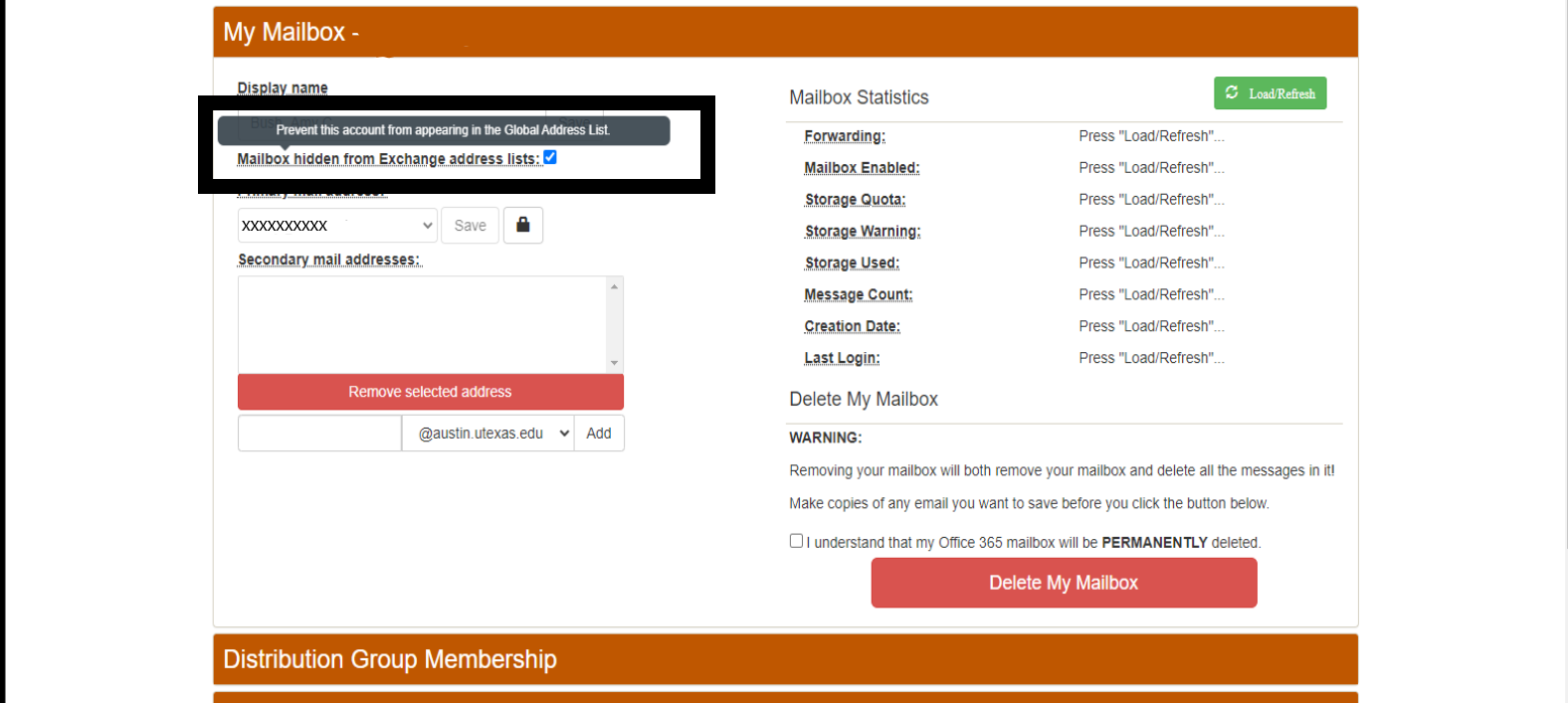
Then go here: office365.austin.utexas.edu. Select Outlook Web App (OWA) and login.
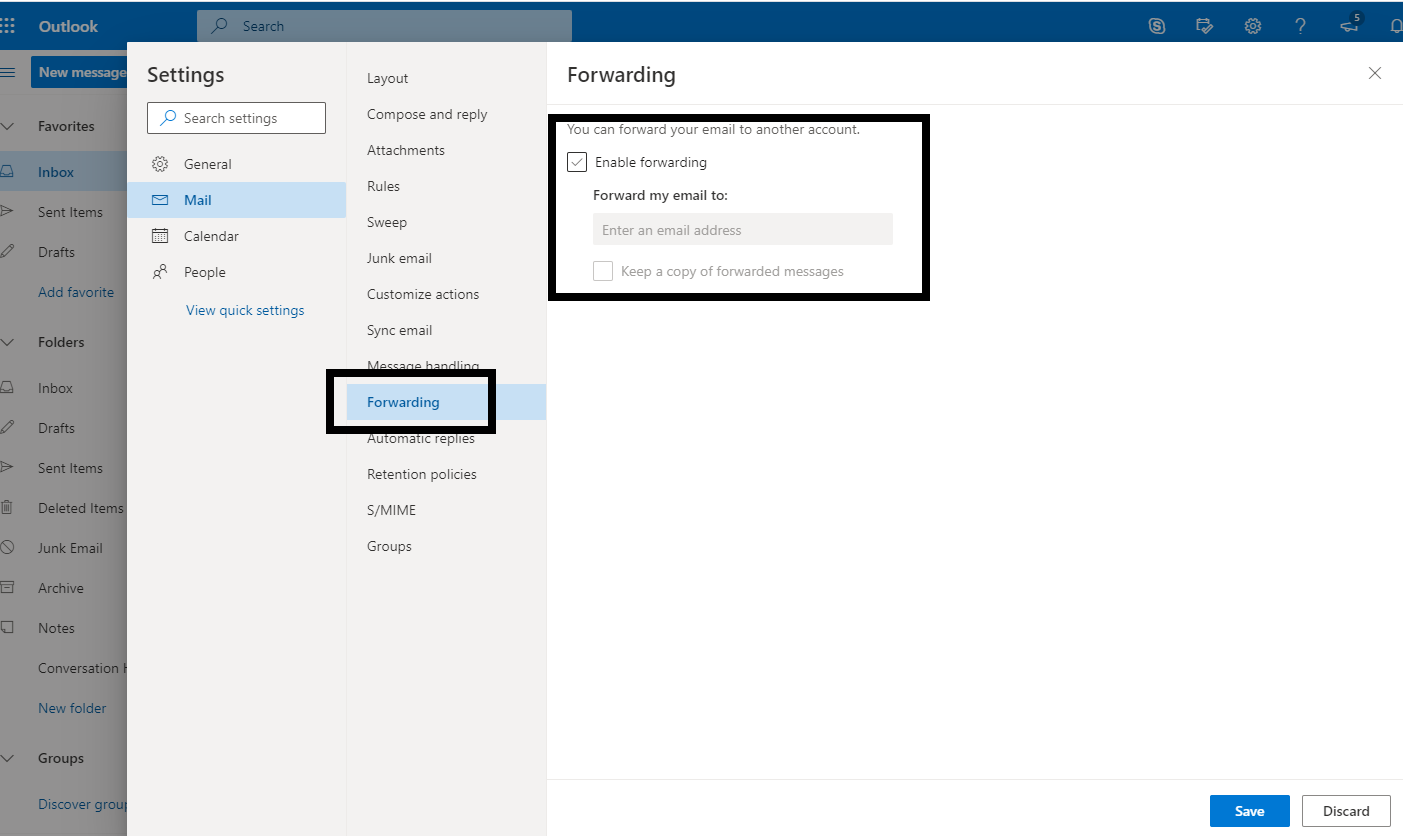
In the OWA click on the gear icon at the top right; click "View all Outlook settings", then find the forwarding option and configure your forwarding for the @austin.utexas.edu address.
All POP/IMAP users should use "mailbox2.cs.utexas.edu" as their "incoming" server. Note that, in general, CS recommends the use of IMAP instead of POP, especially if you check mail from multiple computers and/or mobile devices.
The SMTP server is "mail2.cs.utexas.edu".
For complete details see our Email Configuration page.
[Permalink]This means you are trying to send mail via the UTCS SMTP server, but the user name and password is either missing or misconfigured. See our Email Configuration page for details on how to set this up.
Note that the new SMTP server (mail2.cs.utexas.edu) no longer requires you to use a different password from the one you use to retrieve email.
[Permalink]The CS department install of procmail which filters your mail upon delivery is specially configured for our environment. It is set up as usual via your ~/.procmailrc file, but with two caveats:
- You may not run a program from your .procmailrc. This is to protect our mailserver (and thus your mailbox), not only from deliberately malicious actions but also from accidental misconfigurations which would swamp the server. Since our mail server does not allow user logins for the same reasons, this is an extension of existing policy.
- You may not forward mail to another user via the '!' mechanism in a procmail recipe. This is to protect the mail server from the high load and eventual meltdown that can be caused by a mail loop.
With these restrictions in mind, the main use of procmail during message delivery at CS is to filter your mail in real-time into different folders based on headers (such as the score it received from our spam-analysis system, the sender, a mailing-list-specific header, or the subject).
Since we have disabled execute and forward functionality in procmail during delivery, we suggest using the example in the procmail(1) man page for a template in creating your own post-processing scripts. The version of procmail in /lusr/bin which you can run manually does not suffer these limitations.
(Search for the third occurrence of the string 'cron' in this man page to find the example script.)
Two changes you will need to make to that script are to change the $ORGMAIL variable to point to the actual location of the folder, and to provide a separate procmail recipe file to the executed version of procmail in the script (the line formail -s procmail < .newmail && will need to be changed to formail -s procmail /path/to/your/recipefile < .newmail && ).
These scripts can be run periodically via the cron(1) command to do the actions automatically, or you can run them before you read mail to do something like filter out the messages or text you don't like.
PLEASE NOTE: To avoid clobbering mail folders make sure all recipes start with :0:, not just :0. The procmailrc(1) and procmail(1) manpages have more details."
[Permalink]While there may be any number of reasons for the failure, many ISPs and organizations block outbound network traffic on port 25 (the SMTP port) that mail servers use to communicate with each other as one method of stopping spam. If you are using CS's server for your outgoing mail server, we recommend you use port 587 (the Submission port) with STARTTLS turned on. For more information see our Email Configuration page. if you still encounter problems sending mail please do not hesitate to email help@cs.utexas.edu and we will try to help you resolve the problem.
[Permalink]The POP/IMAP servers and some mail reader software (anything that uses the c-client library) use this "dummy" message to maintain state over time. Because our POP/IMAP server recognizes this message as containing metadata, it doesn't send it to POP/IMAP clients, such as Apple Mail or Thunderbird, so you'll normally never see it. But if you use an email client that doesn't recognize this as a "special" message, it will show it to you as a regular message. It's true that if you delete the message, you may lose important information, such as whether messages are read/unread, whether they've been seen at all by the client (which could lead a POP client to "duplicate" some messages), etc.
[Permalink]The newer SMTP server (mail2.cs.utexas.edu) no longer requires a separate SMTP email password, so you will simply use your standard CS account password. See our Email Configuration page for more details
[Permalink]You have several options:
- You can use the CS webmail to connect to your CS mail account. Simply log in using your CS account and password.
- You can use a third party webmail system, such as Outlook.com, GMail or Yahoo. Specific instructions for setting this up will vary by webmail provider so it's beyond our ability to support, but googling for "other" "email" "account" and the name of the provider should get you pointed in the right direction. Note that many of these only allow POP access to your CS email account, so if you plan to still use other email software to access your CS email, choose the settings in your webmail provider's configuration carefully (leave email on server, in particular).
- Forward your mail to a separate offsite address which already provides webmail, such as those mentioned above as well as others.
Use the 'vacation' program. You can read the vacation(1) man pages for usage info, but the quick-start method is to create a message you'd like to send in response to emails you receive and save it as ~/.vacation.msg, and then run vacation -i. To turn this off, simply remove ~/.vacation.msg.
[Permalink]All mail forwarding on the CS system is handled by a central user account database; .forward files won't work. To get mail forwarded, email help@cs.utexas.edu from your UTCS email account and make the request. UTCS email is never forwarded past the lifetime of an account. UT offers alumni email here. If you want to learn more about how to use procmail on our systems, check out the FAQ on procmail.
[Permalink]Mailing lists, for the most part, are only created for "official" department purposes (lists of students in a class created for TAs, etc). These are the steps to take to create one:
- Create a file of the people who should be on the list, one email address per line.
- Make the file world readable.
- Make all directories in the path to the file world executable.
- Email help@cs.utexas.edu, giving the name of the alias you want, the name and path of the file, and the purpose of the alias.
The alias, if approved, will become effective within one or two business days.
[Permalink]There's not really a way to opt out of using the spam filter, but users do have the ability to tune how aggressively the filter behaves on mail sent to you. In your user directory, there is a hidden directory named .spamassassin, and Inside of that is a text file called user_prefs (there are other files too, but you should leave those alone). Using a text editor, you can add one of the following lines to the end of the file:
- whitelist_to {your email address}
- more_spam_to {your email address}
- all_spam_to {your email address}
These choice are list in order of how much spam will be allowed through the filter, where the first will be a fair amount, the second will allow most spam through, and the third will let in all but the most egregious spam.
If you are turning off the spam filter because you have found it to be making mistakes (either false positive or false negative), please email nospam@cs.utexas.edu --we want to know!
[Permalink]Our spam filtering relies partly on a bayesian filter, which requires constant training to keep up with the ever changing tactics of spammers. You can help us by sending a complete copy of your spam emails to nospam@cs.utexas.edu. Please note, this must be a *complete* copy of the email, including all headers. The easiest and best way to send the mail is to use your mail client's ability to "Forward as an Attachment".
[Permalink]Multimedia
For lectures and talks filmed in POB visit the POB media site.
For lectures and talks filmed in GDC visit the UTCS video site.
[Permalink]Printing
You can type "man printers" for information on how to use the printers, what the printer names are and how to refer to them, etc. The commands to use the printer are: lpr -Plw[printernumber] [yourfile] - prints "yourfile" to the named printer. lpq -Plw[printernumber] - displays the current print queue for the named printer. lprm -Plw[printernumber] [job ID] - removes the job with ID job-ID from the print queue for the named printer. Job ID's are found with 'lpq'.
[Permalink]To find out which printers can be printed to ("public" printers), use the command ypmatch lw.pub machines. For more information about the printers (location, usage, etc.) please run man printers.
[Permalink]A lot of information about printers, including location, is stored in the file /lusr/share/etc/printcap -- you can look there for the location of a specific printer. You can also run man printers for usage and location information about the public printers.
[Permalink]Press the down arrow button, and it will ask you if you would like to print to normal paper that is available. Press OK and it should begin to print using the paper from one of the trays.
[Permalink]This is outlined in our Wireless Printing guide.
[Permalink]This is outlined in our Wireless Printing guide.
[Permalink]Please see our documentation page on CUPS printing options.
[Permalink]Type 'lpq -Plw[printernumber]'. This will often display an error message such as "Out of paper" or "Paper jam". If one of these errors has occurred, correct it (put more paper in the printer or open it and clear the jam if the printer is not physically locked). If that doesn't fix the problem, or if no such problem is displayed, restart the printer daemon with the command /lusr/etc/restart_lw -Plw[printernumber] and see if that fixes it. If the printer seems to be hanging on a specific large job, try cancelling that job and restarting the printer daemon. If none of these steps clears the problem, contact help@cs.utexas.edu and describe the problems and the steps you've taken.
[Permalink]You don't. The software is specifically setup to prevent you from doing this. Printers are not copiers and should not be used as such.
[Permalink]Programming
An Oracle database server and a MySQL server are installed for use by some classes; please check with the class instructor about how to get access to them and how to use them. The MySQL database server program (mysqld) is installed only on the Linux machines and client programs and libraries on all of the architectures when requested by an instructor.
[Permalink]We have installed Java in /usr/bin/java. We generally have the latest version on the default system path so you will get that version by default. All version of java are installed in /usr/lib/jvm, if you need a different version.
[Permalink]GNU gcc is available in /usr/bin/gcc. g++ is the C++ compiler based on gcc and is located in /usr/bin/g++. There are several additional versions of each of these (4.4, 4.6 and 4.8 found by adding -4.4, etc to the path). GNU gcc 5.2 is installed in /lusr/opt/gcc-5.2.0. If you need that version, you'll need to add /lusr/opt/gcc-5.2.0/bin to your path.
[Permalink]Yes, the directory location is: /usr/bin/perl. Perl (Practical Extraction and Report Language) is a scripting language often used under UNIX. Perl provides access to all operating system calls but is interpreted (not compiled), so it is faster to code and easier to debug than writing, say, C; but it typically runs more slowly.
[Permalink]Yes, Python is located in the directory: /usr/bin/python. Python is an interpreted, interactive, object-oriented programming language that combines power with clear syntax. See "man python" for more information.
[Permalink]gcl is available as /usr/bin/gcl, Steel Bank Common Lisp as /usr/bin/sbcl, and clisp as /usr/bin/clisp.
[Permalink]GNU gdb (/usr/bin/gdb) is available on all of the supported machines. ddd (/usr/bin/ddd) is a graphical interface to gdb. All debuggers should work for either C or C++, and possibly FORTRAN and Pascal as well.
[Permalink]Tcl is located in the directory /usr/bin/tclsh, and wish is located in the directory /usr/bin/wish. Also, Tcl extensions expect, itcl, and tix are installed.
[Permalink]Text Editing
LibreOffice is installed on the linux machines and it capable of viewing Microsoft documents. Just run /usr/bin/libreoffice or select it from the applications menu in your windows manager.
[Permalink]You can view the file using evince, libreoffice, gv or xpdf. LibreOffice supports printing to PDF files.
[Permalink]The two major UNIX editors are emacs and vi. Other editors installed are xedit, xemacs, pico, ed, sublime_text, and nano.
[Permalink]Hold down the ctrl key and press x; then c. Please make sure you exit before you log out. See the man pages on Emacs for more information.
[Permalink]Press the escape key (esc on some machines) to make sure you are in command mode (also called edit mode). In command mode type "ZZ" or ":wq". If you want to exit without saving changes, use ":q!".
[Permalink]Unix
New UNIX groups, for the most part, are only created for "official" department purposes (students working together in a class created at the request of the professor, for example). If you have a reason to need a group, Email help@cs.utexas.edu, giving the name of the group you want, the login names of the people who need to be in it, and the purpose of the group. The group, if approved, will be created within one or two business days.
[Permalink]It means that all new files will be created with the same group id as that of the parent directory. The lowercase s shows that the directory is also executable, meaning you can cd into it.
[Permalink]That functionality is typically provided by the GNU Readline Library, which is used by many applications such as shells (bash, tcsh, zsh), mailreaders (mutt) and many others. However, some applications are not readline-aware but fear not, there is a way to make them behave like they are! We have installed the program rlwrap which provides readline functionality to any text input program. It is in the standard path and can be run with any client application, though there are many applications (anything graphical for instance) with which it would not make sense. An example execution would be:rlwrap acl which starts the allegro common lisp interpreter with readline functionality.There is a man page (rlwrap(1)) for your edification.
[Permalink]This is typically caused by older programs that can't handle unicode properly. You will need to add export LANG=C to your .profile file (or whichever shell config file you use, such as .bashrc).
[Permalink]The ImageMagick suite is capable of all types of conversion. Using it is simple: convert originalfile.format newfile.newformat convert automatically determines the original filetype from the file itself and chooses the output format based on the file extension you provide for the newfile. For example, convert file.ps file.gif will convert the file from postscript to GIF. see the convert(1) man page for more information on the formats it supports.
While ImageMagick supports multi-page GIF files, many utilities and viewers do not, so you may wish to either convert single pages of the PS file to GIF format, or first use the psnup command to reduce (the relevant pages of) your document to a single page
[Permalink]As of April 12, 2019, SSH keys are required when SSHing to CS/CSRES networks when outside of our networks, campus wireless, or the VPN. The University ISO will quarantine any host allowing SSH access that has not disabled password authentication.
For instructions on creating SSH keys, visit this page.
[Permalink]System news can be found on the System Status blog. A RSS feed of this blog is available for news tracking. If you prefer to receive these updates through email as they are posted, you can send mail to help@cs.utexas.edu requesting to be added to the mailing list for system news.
[Permalink]To find a runaway process, use the ps command. On linux machines type ps -augx. The man pages (man ps) show all possible flags.
To kill a process once you've found its process ID (PID), type "kill PID". If that doesn't work, you can use "kill -9 PID". If you need to kill all your processes, you can use "killall -u 'login name'"
[Permalink]To find out which machine Firefox is running on, type:
ls -l ~/.mozilla/firefox/*/lock
If there is a lock, it will be a symbolic link pointing to a file with the IP address of the computer where it is running followed by the process ID it is using. To translate IP-ADDRESS to a host name, type:
host <IP-ADDRESS>
The process id should also be present, so type:
rsh <HOSTNAME> kill PID
For example:
~>ls -l ~/.mozilla/firefox/*/lock
lrwxrwxrwx 1 rivin dept 20 Jan 18 14:04 /u/rivin/.mozilla/firefox/uiil642a.default/lock -> 128.83.120.48:+24876
~>host 128.83.120.48
48.120.83.128.in-addr.arpa domain name pointer eagle.cs.utexas.edu.
~>rsh eagle kill 24876
Be sure to remove the lockfile if killing the process didn't!
~>rm ~/.mozilla/firefox/*/lock
If this doesn't work, you will need to delete the .parentlock file:
~>rm ~/.mozilla/firefox/*/.parentlock
[Permalink]If your file starts with a minus, use the -- flag to rm; if your file is named -g, then your rm command would look like rm -- -g. As well, and especially if you have an unprintable character (output from ls looks like ?ile) you might try something like rm -i ./*ile which will also work for commands other than rm (grep for instance).
[Permalink]The "public" software is anything installed in the /p or /public directory (typically, actual programs are in /p/bin). This software is installed by non-staff (students, researchers, or professors) and is not monitored, installed or maintained by the staff; if you're having trouble with a particular program, contact the person who installed that package (as shown by ls -l) directly, or email public@cs.utexas.edu, which is a mailing list of all people who maintain programs in /public. If you want to enable your account to install software in /public, email help@cs.utexas.edu and they'll add you to the group and mailing list.
[Permalink]Please don't use "find /", as it's very slow and a real drain on the network. Use locate by typing locate [string], where [string] is the name of the file you want to find, or part of the name. It's more appropriate to use find to find something in a fairly small area, such as your home directory or a /projects directory, neither of which are searched by locate. The basic find syntax is 'find [path to search] [expression to search for]'; please read the man page for find, for more detailed information.
[Permalink]First, you should try recovering the file from snapshots yourself; to learn how view the documentation on recovering files from snapshots. If that fails, email help@cs.utexas.edu and ask them to restore your files. Include the following information:
- When did you delete the file(s)?
- When did you create the file(s)? ("Not recently" is enough)
- When did you last change the file(s), before the day you deleted it/them?
You can check your quota usage with the "chkquota" command. You can find out how much disk space is in a particular directory (such as someone's home directory) with the command du -sk, if you have permissions on that directory -- if it's yours or if it's world-readable.
[Permalink]World Wide Web
For most common questions about setting up a web page and putting scripts, images, links, etc. in it in the CS domain, see the documentation on using the web.
[Permalink]Yes. We only support PHP5, not PHP4.
A mod_php script should have the suffix .php and no #! line A CGI script should invoke #!/usr/bin/php5-cgi at the top and have the .cgi suffix.
For more information, see the documentation on using the web The PHP documentation is available at http://www.php.net.
[Permalink]Yes. You can use dynamic configuration files using an .htaccess file to restrict access to documents in your web directory. For more information on this, see the documentation on using the web.
[Permalink]By default, CGI scripts running on our server execute as the web user www; this user has no special permissions. Thus, the directory in which the script resides must be world-searchable, the script must be world-executable, and files read or written by the script must be world-readable or world-writable.
In certain applications, you may prefer that a script execute with your Unix account permissions so as to access protected data. We provide a "Secure CGI" mechanism for doing this.
Warning: Please carefully weigh your need for this feature against the security risks of a script running with the full permissions of your user account. You are responsible for the use of that account, whether by your own hand, by someone using a workstation where you left yourself logged in, or by someone exploiting a poorly written script which you have made available on the Web. You may wish to review our policies.
The basic guidelines for setting up a secure CGI script are:
- Full script pathnames should contain only printing ASCII characters. They should not contain relative path components.
- Script directories should be searchable by the owner and have the same owner/group as the script file. They should not be writable by anyone other than the owner
- Script files should be a regular file (not a symlink), be executable by the owner and have the extension ".scgi".They should not be setuid or setgid or writable by anyone other than the owner.
Other notes:
- Non-parsed-header scripts may be used with the usual nph- prefix.
- Access control directives (in a .htaccess file) will not work for a .scgi script. Normally, this is not a problem, since the script is typically the action associated with a form in a .html file, which can be access controlled. Of course, the script is at liberty to implement any authentication for itself that it chooses.
This is a tough question; there is definitely some content such as sounds and images which will never be universally available to blind or deaf users. However for the most part, staying standards compliant and making sure that your pages have no syntax errors or dependency on a specific browser is the best way to be sure of reaching the widest possible audience.
The canonical reference for the most popular and most widely supported markup languages, HTML and XHTML, is published by the World Wide Web Consortium. This documentation is the agreed-upon standard for web markup across the entire internet. It is likely to be supported by all browsers, from cell phones and text-only browsers for the blind to the latest version of Internet Explorer.
To be sure you've created pages that not only meet the standards but fail to have any content-impairing typos, you should probably run them through the XHTML and HTML validator and potentially through the CSS validator as well, if you have used cascading style sheets for further page layout. Be warned that older or less capable browsers may not support CSS so do try reading your page without the CSS in the source to see if all text displays fully and legibly in its absence.
Although it is popular to write browser-specific code targetting IE or mozilla/netscape, and although such code may work on the majority of the browsers available today, you do limit your site's usefulness by doing so. Consider whether you think the cute tricks with the cursor or ActiveX controls are worth someone not being able to find the link to your resume or research. Old, small, and handicapped accessible browsers may be unable to use your site and often will just ignore it instead of informing you. The "Viewable With Any Browser" campaign may serve to further enlighten you as to the rationale behind creating more compatible web pages. Do consider making your page fully handicapped accessible.
[Permalink]X Window System
If your computer is connected to the internet, you can run ssh -X hostname where hostname is the name of the computer that you want to log into. The -X flag enables X forwarding. You can then run X applications within that ssh window and they will display on your local desktop. For further information, such as getting this to work on the Windows operating system, see the SSH X Forwarding documentation page.
VNC is also available, although we generally discourage its use when X forwarding is an option.
[Permalink]There are a number of options available for your use. Some of the choices are: Fvwm, GNOME, KDE, LXDE, Openbox, Window Maker, and Xfce. You can set your window manager by clicking on the foot drop box on the login screen.
[Permalink]If you have logged into our UNIX machines before they were all updated to Trusty, you may need to remove your old config files for the windows manager you are using. You can use Ctrl+Alt+F1 (Ctrl+Alt+F7 or F8) will get you back to the graphical login screen) to get to a virtual console and the dotfiles/directories in question are:
- gnome - .gnome2, .gnome2_private, .gconf, and .gconfd
- kde - .kde and .kderc
- xfce - .config, .gconf, and .gconfd
If you are using gnome as your windows manager and you try to use MATLAB, you may run into this issue. To fix the problem, go to System Menu -> Preferences -> Appearance, then select the 'Visual Effects' tab. Set the effects to 'None' and close the window. MATLAB should behave normally once this is done.
[Permalink]Application-Based Academies
The Academy for Women and Academy for All are hosted by the Department of Computer Science at The University of Texas at Austin in the Gates-Dell Complex.
[Permalink]United States-based students entering grades 11-12 in Fall 2025 are eligible to apply.
[Permalink]Students are encouraged to apply to both Academy for Women and Academy for All sessions, if applicable. Please note that students will only be admitted to one session. If you apply to multiple sessions, you may list your preferences in the application.
[Permalink]No programming experience? No problem! Our labs are designed to teach you to program or expand your programming skills to accomplish the project.
[Permalink]Students must provide their contact information, academic records, a brief essay, their most recent progress report, and an unofficial transcript.
[Permalink]Join us as we use the Arduino microcontroller to program LED light displays - you will work with a small group of peers to make your lights put on a show or dance to music. Students in the Academy for All Machine Learning Edition will learn how to understand and implement machine learning concepts.
Outside of lab time, students will attend guest speaker presentations, tour UT facilities, and join various social activities. A field trip to a local tech company to meet corporate representatives and learn about their experience in CS may also be included in the weekly schedule.
[Permalink]All UT Computer Science Summer Academies are led by UT Austin Computer Science faculty members. More information on each faculty member can be found in the Academy Staff section.
[Permalink]There is no cost to participate in Academy for Women or Academy for All. Housing and meals for the week-long program are also included. Students may apply for travel scholarships for up to $500 to help pay for transportation to and from Austin if needed.
[Permalink]Students will stay in one of the residence halls on the UT Austin campus. To learn more about the UT Austin residence halls, visit: housing.utexas.edu/housing/residence-halls. Breakfast, lunch, and dinner are provided for the academy participants. Students will eat at one of the main dining halls on campus. Top 9 allergen-free meals are available. For more information on dining, visit: housing.utexas.edu/dining/dining-locations/dining-halls.
Each student will be assigned to a residence hall room with a roommate. Rooms are shared with another student of the same gender and all residence hall floors are split by gender. Each floor has counselors of the same gender as students on that floor. Please contact us with any specific questions.
[Permalink]Please email our team at academies@cs.utexas.edu and we will direct you to our Academy Accommodations Coordinator. Please be as specific as possible in your message so we can best assist you.
[Permalink]Academy participants are supervised at all times. Each participant will be placed into a group of around 10 students and will be supervised by a counselor 24 hours a day. Our daytime counselors, Program Assistants, provide supervision and help students in the computer lab and during programming activities. Our evening counselors, Resident Assistants, provide supervision and engage students in social activities and stay in the dorms overnight.
[Permalink]Typically, students have breakfast around 7:30 in the morning and begin their first activity at 8:30 am. From 8:30 am - 5:00 pm, students are either in the computer lab working on their group projects, taking a break for lunch, attending a guest lecture, or touring different departments on campus. After dinner, students will participate in various social activities including bowling, movie night, basketball, volleyball and more. All academy participants return back to their residence hall each night by 9:30 pm.
[Permalink]Academy for iOS App Development
The Academy for iOS App Development is hosted by the Department of Computer Science at The University of Texas at Austin in the Gates-Dell Complex. All activities are hosted on the UT Austin campus, which is where students will stay for the duration of the program.
[Permalink]Students in this academy should be at an intermediate programming level and should have prior experience with programming in languages such as C++, Java, or Python. All participants in this academy must bring a 13-inch or larger MacBook Air or MacBook Pro.
[Permalink]Students will create simple apps for the iPhone and iPad and install them on their personal devices. They will code projects with advanced features of Swift, Apple's strategic programming language, and learn to use Xcode, Apple's official tool for software development.
Outside of lab time, students will attend guest speaker presentations and activities, tour UT facilities, and join various social activities.
[Permalink]All UT Computer Science Summer Academies are led by UT Austin Computer Science faculty members. More information on each faculty member can be found in the Academy Staff section.
[Permalink]The cost of tuition for the 6-day immersive academy is $2,100. Housing, meals, instruction, and all educational and recreational activities are included in the cost.
All participants in this academy must bring a 13-inch or larger MacBook Air or MacBook Pro. We are unfortunately unable to provide Apple computers to students for this program.
Academy tuition scholarships are available on a limited basis. Registrants with financial need can apply for a scholarship by completing the scholarship application, which opens with registration for the summer academies.
[Permalink]Students will stay in one of the residence halls on the UT Austin campus. To learn more about the UT Austin residence halls, visit: housing.utexas.edu/housing/residence-halls. Breakfast, lunch, and dinner are provided for the academy participants. Students will eat at one of the main dining halls on campus. Top 9 allergen-free meals are available. For more information on dining, visit: housing.utexas.edu/dining/dining-locations/dining-halls.
Each student will be assigned to a residence hall room with a roommate. Rooms are shared with another student of the same gender and all residence hall floors are split by gender. Each floor has counselors of the same gender as students on that floor. Please contact us with any specific questions.
[Permalink]Please email our team at academies@cs.utexas.edu and we will direct you to our Academy Accommodations Coordinator. Please be as specific as possible in your message so we can best assist you.
[Permalink]Academy participants are supervised at all times. Each participant will be placed into a group of around 10 students and will be supervised by a counselor 24 hours a day. Our daytime counselors, Program Assistants, provide supervision and help students in the computer lab and during programming activities. Our evening counselors, Resident Assistants, provide supervision and engage students in social activities and stay in the dorms overnight.
[Permalink]Typically, students have breakfast around 7:30 in the morning and begin their first activity at 9:00 am. From 9:00 am - 4:00 pm, students are either in the computer lab working on their projects, taking a break for lunch, attending a guest lecture, or touring campus. After dinner, students will participate in various social activities including bowling, movie night, basketball, and more. All academy participants return back to their residence hall each night by 9:30 pm.
[Permalink]Academy for Game Development
Students do not need to submit an application for the Academy for Game Development. Click the “Enroll now” button on the webpage and you will be walked through the enrollment process in the Ideal-Logic portal. When you enroll, be sure to select “Community Login,” not “University of Texas Login” and select the correct program. Enrollment contains contact, emergency, and medical information, as well as subject matter-related background information and agreements for both participants and parents/guardians to sign.
[Permalink]No programming experience? No problem! Our labs are designed to teach you to program or expand your programming skills to accomplish the project. All participants should be interested in games and the game development process.
[Permalink]The cost of tuition for the 6-day immersive academy includes housing, meals, instruction, and all educational and recreational activities.
Academy scholarships are available on a limited basis. Registrants with financial need can apply for a scholarship by completing the scholarship application, which will open with registration for the summer academies.
[Permalink]Students will stay in one of the residence halls on the UT Austin campus. To learn more about the UT Austin residence halls, visit: housing.utexas.edu/housing/residence-halls. Breakfast, lunch, and dinner are provided for the academy participants. Students will eat at one of the main dining halls on campus. Top 9 allergen-free meals are available. For more information on dining, visit: housing.utexas.edu/dining/dining-locations/dining-halls.
Each student will be assigned to a residence hall room with a roommate. Rooms are shared with another student of the same gender and all residence hall floors are split by gender. Each floor has counselors of the same gender as students on that floor. Please contact us with any specific questions.
[Permalink]Please email our team at academies@cs.utexas.edu and we will direct you to our Academy Accommodations Coordinator. Please be as specific as possible in your message so we can best assist you.
[Permalink]Academy participants are supervised at all times. Each participant will be placed into a group of around 10 students and will be supervised by a counselor 24 hours a day. Our daytime counselors, Program Assistants, provide supervision and help students in the computer lab and during programming activities. Our evening counselors, Resident Assistants, provide supervision and engage students in social activities and stay in the dorms overnight.
[Permalink]Each day begins with breakfast at 7:30 am, followed by the first activity at 9:00 am. From 9:00 am to 4:00 pm, students dive into a mix of learning and hands-on experiences, either in the computer lab working on their small group projects or attending engaging faculty-led lectures. Students will also participate in guest talks and explore different departments around campus through guided tours. Throughout the day, students receive personalized guidance and mentorship from faculty and Program Assistants, ensuring they have the support they need to succeed in their game development projects.
After dinner, the fun continues with social activities such as bowling, movie nights, basketball, and other team-building events. All students return to their residence hall by 9:30 pm to wind down for the night.
[Permalink]Academy for Machine Learning
The Academy for Machine Learning is hosted by the Department of Computer Science at The University of Texas at Austin in the Gates-Dell Complex. All activities are hosted on the UT Austin campus, which is where students will stay for the duration of the program.
[Permalink]Students do not need to submit an application for the Academy for Machine Learning. Click the “Enroll now” button on the webpage and you will be walked through the enrollment process in the Ideal-Logic portal.
[Permalink]No programming experience? No problem! Our labs are designed to teach you to program or expand your programming skills to accomplish the project.
[Permalink]Students will explore programming in Python as they dive into the fundamentals of machine learning. They will learn from UT faculty and work alongside peers to implement machine learning concepts and discuss societal implications of the field.
Outside of lab time, students will attend guest speaker presentations, tour UT facilities, and join various social activities.
[Permalink]All UT Computer Science Summer Academies are led by UT Austin Computer Science faculty members. More information on each faculty member can be found in the Academy Staff section.
[Permalink]The cost of tuition for the 6-day immersive academy is $2,100. Housing, meals, instruction, and all educational and recreational activities are included in the cost.
Academy scholarships are available on a limited basis. Registrants with financial need can apply for a scholarship by completing the scholarship application, which will open with registration for the academies.
[Permalink]Students will stay in one of the residence halls on the UT Austin campus. To learn more about the UT Austin residence halls, visit: housing.utexas.edu/housing/residence-halls. Breakfast, lunch, and dinner are provided for the academy participants. Students will eat at one of the main dining halls on campus. Top 9 allergen-free meals are available. For more information on dining, visit: housing.utexas.edu/dining/dining-locations/dining-halls.
Each student will be assigned to a residence hall room with a roommate. Rooms are shared with another student of the same gender and all residence hall floors are split by gender. Each floor has counselors of the same gender as students on that floor. Please contact us with any specific questions.
[Permalink]Please email our team at academies@cs.utexas.edu and we will direct you to our Academy Accommodations Coordinator. Please be as specific as possible in your message so we can best assist you.
[Permalink]Academy participants are supervised at all times. Each participant will be placed into a group of around 10 students and will be supervised by a counselor 24 hours a day. Our daytime counselors, Program Assistants, provide supervision and help students in the computer lab and during programming activities. Our evening counselors, Resident Assistants, provide supervision and engage students in social activities and stay in the dorms overnight.
[Permalink]Typically, students have breakfast around 7:30 in the morning and begin their first activity at 8:30 am. From 8:30 am - 5:00 pm, students are either in the computer lab working on their group projects, taking a break for lunch, attending a guest lecture, or touring departments on campus. After dinner, students will participate in various social activities including bowling, movie night, basketball, and more. All academy participants return to their residence hall each night by 9:30 pm.
[Permalink]Academy for Robotics
The Academy for Robotics is co-hosted by the Department of Computer Science and Texas Robotics at The University of Texas at Austin in the Gates-Dell Complex. Students will also spend time in the Engineering Education and Research Center and the Anna Hiss Gym. All activities are hosted on the UT Austin campus, which is where students will stay for the duration of the program.
[Permalink]Students do not need to submit an application for the Academy for Robotics. Click the “Enroll now” button on the webpage and you will be walked through the enrollment process in the Ideal-Logic portal. When you enroll, be sure to select “Community Login,” not “University of Texas Login.” Enrollment contains contact, emergency, and medical information, as well as subject matter-related background information and agreements for both participants and parents/guardians to sign.
[Permalink]No programming experience? No problem! Our labs are designed to teach you to program or expand your programming skills to accomplish the project. Some experience with C++ programming may be beneficial but is not required.
[Permalink]All UT Computer Science Summer Academies are led by UT Austin Computer Science faculty members. More information on each faculty member can be found in the Academy Staff section. The Academy for Robotics is also guided by Program Assistants, who are current undergraduate students trained to assist in robotics assembly and programming.
[Permalink]The cost of tuition for the 6-day immersive academy is $2,100. Housing, meals, instruction, and all educational and recreational activities are included in the cost.
Academy scholarships are available on a limited basis. Registrants with financial need can apply for a scholarship by completing the scholarship application, which opens with registration for the summer academies.
[Permalink]Students will stay in one of the residence halls on the UT Austin campus. To learn more about the UT Austin residence halls, visit: housing.utexas.edu/housing/residence-halls. Breakfast, lunch, and dinner are provided for the academy participants. Students will eat at one of the main dining halls on campus. Top 9 allergen-free meals are available. For more information on dining, visit: housing.utexas.edu/dining/dining-locations/dining-halls.
Each student will be assigned to a residence hall room with a roommate. Rooms are shared with another student of the same gender and all residence hall floors are split by gender. Each floor has counselors of the same gender as students on that floor. Please contact us with any specific questions.
[Permalink]Please email our team at academies@cs.utexas.edu and we will direct you to our Academy Accommodations Coordinator. Please be as specific as possible in your message so we can best assist you.
[Permalink]Academy participants are supervised at all times. Each participant will be placed into a group of around 10 students and will be supervised by a counselor 24 hours a day. Our daytime counselors, Program Assistants, provide supervision and help students in the computer lab and during programming activities. Our evening counselors, Resident Assistants, provide supervision and engage students in social activities and stay in the dorms overnight.
[Permalink]Typically, students have breakfast around 7:30 in the morning and begin their first activity at 8:30 am. From 8:30 am - 5:00 pm, students are either in the computer lab working on their group projects, taking a break for lunch, attending a guest lecture, or touring departments on campus. After dinner, students will participate in various social activities including bowling, movie night, basketball, and more. All academy participants return back to their residence hall each night by 9:30 pm.
[Permalink]Admissions
We're looking for students who are strong in academics, excited about both computer science and another field, and ready to apply both to solving real-world problems. You should be calculus ready and eager to integrate computing with your chosen discipline.
[Permalink]Due to differences in degree requirements, X+CS students are ineligible for the Turing Scholars Honors program and College of Natural Sciences honors programs, including Dean's, Polymathic, and Health Science Scholars. You can petition for individual CS honors courses or apply for the College of Liberal Arts Plan II Honors program.
[Permalink]Yes! Attend a UT Austin In-person Interest Session to learn more about X+CS, Computer Science, and the College of Liberal Arts. If you're admitted, you can schedule a campus visit with a student recruiter, including options like sitting in on a class or meeting with an X+CS advisor.
[Permalink]Yes, if you're not admitted to the X+CS program, you’ll still be fully considered for your first and second-choice majors without disadvantage.
[Permalink]X+CS students have access to resources from both departments in their integrated degree, including student organizations, department events, research opportunities, and career services. College-wide support, such as career fairs and wellness resources, is also available. Learn more about research opportunities through:
- College of Natural Sciences Research (All X+CS degrees)
- College of Liberal Arts Research (History+CS & Linguistics+CS)
Virtual X+CS info sessions are held throughout year.
[Permalink]Academy for Data Science Research
The Academy for Data Science Research is hosted by the Department of Computer Science at The University of Texas at Austin in the Gates-Dell Complex. All activities are hosted on the UT Austin campus.
[Permalink]Students do not need to submit an application for the Academy for Data Science Research. Click the “Enroll now” button on the webpage and you will be walked through the enrollment process in the Ideal-Logic portal. When you enroll, be sure to select “Community Login,” not “University of Texas Login.” Please see information on prerequisites below.
[Permalink]Students in this academy should have at least one semester of Python programming experience. All participants in this academy must bring their own laptop.
[Permalink]Students will learn how to conduct research in the field of data science. Students will be introduced to essential tools such as Jupyter Notebook, NumPy, Matplotlib, and Pandas and will study several machine learning models using Scikit-Learn. At the conclusion of the academy, students will understand how data scientists analyze real-world data to obtain meaningful results.
[Permalink]All UT Computer Science Summer Academies are led by UT Austin Computer Science faculty members. More information on each faculty member can be found in the Academy Staff section.
[Permalink]The cost of tuition for the two-week day academy is $1,400. Lunch is included in the cost. Housing is not provided.
All participants in this academy must bring a laptop. We are unfortunately unable to provide computers to students for this program.
Academy tuition scholarships are available on a limited basis. Registrants with financial need can apply for a scholarship by completing the scholarship application, which opens with registration for the summer academies.
[Permalink]Lunch is provided for the academy participants. Students will eat at one of the main dining halls on campus. Top 9 allergen-free meals are available. For more information on dining, visit UT Austin's Dining Halls page.
[Permalink]Please email our team at academies@cs.utexas.edu and we will direct you to our Academy Accommodations Coordinator. Please be as specific as possible in your message so we can best assist you.
[Permalink]Academy participants are supervised at all times. Our daytime counselors, Program Assistants, provide supervision and help during programming activities.
[Permalink]The academy will take place from 10:00 am - 3:00 pm, Monday - Friday. During this time, students will attend lectures, work on their projects, and take a break for lunch.
[Permalink]